It’s been nearly 3 months since my last blog… I apologize, but I’ll attempt to at least get back to a blog a month schedule from now. Usually, when I write about databases, it’s about how they work in theory. Today’s blog is different, it’ll be about how they break in practice :')
This is the story of how a SELECT SQL query that passed our “good query shape” tests managed to saturate our disk write throughput, causing a cascading degradation and taking down a critical database for one of Databricks’ largest regions. It was a combination of a well-intentioned code change, over-reliance on query “shape” for validation and a subtle bug in the MySQL optimizer source. And to top it all off, it also has its roots in NULL handling!
“I call it my billion-dollar mistake. It was the invention of the null reference in 1965. At that time, I was designing the first comprehensive type system for references in an object oriented language (ALGOL W). My goal was to ensure that all use of references should be absolutely safe, with checking performed automatically by the compiler. But I couldn’t resist the temptation to put in a null reference, simply because it was so easy to implement. This has led to innumerable errors, vulnerabilities, and system crashes, which have probably caused a billion dollars of pain and damage in the last forty years.” - Tony Hoare
The Incident
As (almost) all incidents do, we start with a pager going off and standard database degradation alerts firing for one of our critical databases. The DB was in a degraded state because the write throughput on the disk was off the charts. There was no significant spike in client load for write queries, but somehow the write throughput the DB was sending to it’s attached EBS disk was far higher than what could physically be supported. It’s confusing, but the standard procedure is to mitigate first, analyze after. Usually in a scenario like this, one would try to mitigate the incident by either upscaling the DB or by rate limiting the offending clients. In this case, we were unable to isolate the clients causing the degradation, so we tried upscaling. However, because HA was on for this database & there was disk degradation at the same time, the replication lag on the standby instance was too high, preventing the upscale from executing. This, is bad.
We needed more data. It’s hard to go through the slow query logs since every query is now slow, but we did notice that one particular query was showing up a lot in the slow logs and also had a spike in QPS due to client side load. The only problem was that this query was a SELECT query, and it looked perfectly safe. The table schema & query had this shape:
Even ignoring the fact that this was a read-onlySELECT query, the table had this index KEY idx_cover (category_id, nullable_date, item_name). This query has a small enough LIMIT and had perfect shape, in that it is expected to examine exactly O(limit) rows. At this point, we felt a “noisy neighbor” issue or degradation on the EBS side (due to maintenance or regression) was more likely. But when we ran an EXPLAIN on this query, we noticed that it was doing a filesort.
There was also a noticeable spike in the number of temp tables created coinciding with incident start time. So we rate limited this query and the database condition improved.
While we hunted the root cause, we bought more time by throwing a bunch of bandages at it:
Rate-limited the offending user’s API calls to stem the bleed.
Upscaled the database instance (more vCPUs to handle the load).
ANALYZE TABLE (on a restore, with no success).
The system stabilized enough to stop the user impact after a couple of hours. But latency spikes returned overnight, after the full outage. We needed a permanent fix.
The Fix
Turns out, removing the “useless” columns from the ORDER BY clause magically made MySQL pick the optimal index scan plan.
At first glance, the query looked perfectly safe. The query looks like it should be easily served by a simple covering index scan.
A Primer On InnoDB Indices & filesort
B+ Tree Indices In InnoDB
Secondary indices in InnoDB are usually B+ trees where the keys are the index values and the value is a pointer to the primary key pointer. For the intents of this example, it is sufficient to think of an index as a sorted array of tuples. For example, if we filled up our sample table with these values:
id
category_id
nullable_date
item_name
7
100
NULL
Item X
2
100
2024-01-05 00:00:00
Item B
10
200
NULL
Item Z
1
100
NULL
Item A
5
100
2023-12-31 00:00:00
Item C
3
300
NULL
Item Q
8
200
2024-01-01 00:00:00
Item Y
4
100
NULL
Item D
6
100
2024-01-01 00:00:00
Item E
9
300
2025-01-01 00:00:00
Item R
The index structure would essentially refer to a sorted structure like so:
If you’re wondering how NULL comparisons are handled in ORDER BY conditions, here’s an excerpt from the MySQL manual:
“Two NULL values are regarded as equal in a GROUP BY. When doing an ORDER BY, NULL values are presented first if you do ORDER BY ... ASC and last if you do ORDER BY ... DESC.” - MySQL Manual
Anyways, for a query to be efficient, it needs to only do $O(limit)$ work on the database. That is, it should only need to examine $O(limit)$ rows. To serve our query, it’s sufficient to binary search the first row that satisfies our condition and then iteratively output the next row until the limit is reached or the condition is violated. So this query should be serviceable efficiently, but the MySQL optimizer is unable to determine this and resorts to doing a filesort instead.
filesort
In MySQL, Using filesort doesn’t strictly mean “sorting using a file on disk.” It means the database cannot use an index to satisfy the requested sort order, so it must perform an explicit sort pass. It reads the rows that match the WHERE clause, puts them into a sort buffer, sorts them, and returns the result. If the result set fits in memory (there’s a fixed size sort buffer per connection), this is fast. If it doesn’t, MySQL spills the sort operation to disk, creating temporary files. In this case, the query was run with LIMIT 500, but the WHERE clause matched some $500k+$ rows. So in this case, the DB grabbed all $500k+$ rows, writes them to temporary file(s) on disk, sorts them (might involve creation of more temporary files), and then takes the top 500. This is what was causing the massive increase in disk write throughput despite it being a SELECT query.
Hypothesizing (Experiments!)
To root cause this further, we can try playing around with the query to try to see what’s throwing off the optimizer here. For example, this simpler query:
Is also sufficient to trigger filesort. On the other hand, dropping the nullable_date IS NULL condition from the WHERE was sufficient to let the optimizer pick the index scan. After trying out more variations, it became reasonably apparent that any query of the form
was sufficient to trigger a filesort even if a covering index on col, Y existed.
Validating Our Hypothesis
At this point, to validate our hypothesis, we can use one of the many awesome tools MySQL provides us for debugging the MySQL Optimizer: The Optimizer Trace. You can record the optimizer trace for any query by issuing the following SQL:
SEToptimizer_trace="enabled=on";-- Run the query
SELECT*FROMINFORMATION_SCHEMA.OPTIMIZER_TRACE;
The optimizer trace is quite long, so I’ll only paste relevant sections from it here for analysis:
Notice that category_id has the key "equals_constant_in_where" set to true, but nullable_date does not! Despite the nullable_date IS NULL in our WHERE clause. Because of this, the resulting clause came out to be "resulting_clause": "issue_repro.nullable_date, issue_repro.item_name" instead of what we’d expect, just "resulting_clause": "issue_repro.item_name" . From the MySQL manual again, this is how the optimizer picks what index to use for an ORDER BY:
“The index may also be used even if the ORDER BY does not match the index exactly, as long as all unused portions of the index and all extra ORDER BY columns are constants in the WHERE clause.” - MySQL Manual
Because of the error in the above step, the optimizer concluded that the index idx_cover does not provide order and hence required the filesort operation to be performed despite it not being the actual optimal plan.
Patching MySQL
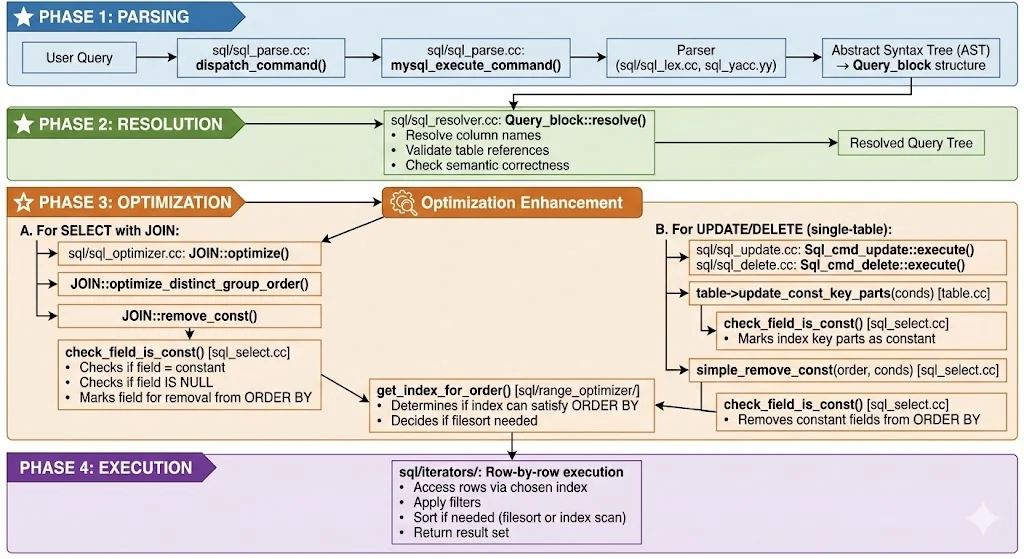
The Life Of A Query
The code structure / flow is pretty much what you’d expect from a Compiler / DBMS codebase. Broadly, you can divide the request execution flow into 4 layers:
Parsing: The input request / query is validated for syntactic correctness and the AST for the query is built. The AST is the output of this stage.
Resolution: The AST is then validated for semantic correctness here. All aliases and references used in the request query are resolved to their physical entries. The output of this stage is the resolved AST.
Optimization & Plan Generation: There’s usually 2 stages of optimization here. What we want is a way to convert the AST into a physically executable plan. A plan is a linear(ish) sequence of steps to be executed. Optimization usually happens in two phases:
Logical Optimization: The AST is transformed by applying some operations on it which optimize out redundant operations & simplify more complex operations into efficient ones while maintaining logical correctness. Any transformation applied here is guaranteed to not change the result set the AST is meant to return on any given data distribution.
Physical Optimization: The AST is converted into a physical plan. The optimizer may use statistics and other heuristics to determine what the best physical operators are for executing each operation in the AST. Is an index scan better? Is a filesort better? Which table should be used as the “hash” set in a JOIN? etc.
The output of this stage is a physical plan, ready for execution.
Eternally grateful to claude-code & Nano Banana Pro 🍌 for both helping me understand this specific codebase quickly & helping me generate this awesome infographic!
The Bug
Here’s a trimmed down version of the code for the check_field_is_const function:
/**
Check if a field is equal to a constant value in a condition
@param cond condition to search within
@param order_item Item to find in condition (if order_field is NULL)
@param order_field Field to find in condition (if order_item is NULL)
@param[out] const_item Used in calculation with conjunctive predicates,
must be NULL in outer-most call.
@returns true if the field is a constant value in condition, false otherwise
*/boolcheck_field_is_const(Item*cond,constItem*order_item,constField*order_field,Item**const_item){// ... non-base condition logic for recursively computing conjunctive
// predicates
Item_func*constfunc=down_cast<Item_func*>(cond);// Bug!!!
if(func->functype()!=Item_func::EQUAL_FUNC&&func->functype()!=Item_func::EQ_FUNC)returnfalse;Item_func_comparison*comp=down_cast<Item_func_comparison*>(func);Item*left=comp->arguments()[0];Item*right=comp->arguments()[1];if(equal(left,order_item,order_field)){if(equality_determines_uniqueness(comp,left,right)){if(*const_item!=nullptr)returnright->eq(*const_item);*const_item=right;returntrue;}}elseif(equal(right,order_item,order_field)){if(equality_determines_uniqueness(comp,right,left)){if(*const_item!=nullptr)returnleft->eq(*const_item);*const_item=left;returntrue;}}returnfalse;}
And there’s the bug! The code exits early if the functype of the condition is not EQUAL_FUNC or EQ_FUNC. This misses handling the ISNULL_FUNC completely!
The Patch
The code is fairly self explanatory, we’ll want to remove that early exit and instead handle the ISNULL_FUNC case in a separate if/else-if branch. The only special case is to handle conjunctive predicates. For example, col IS NULL OR col IS NULL still implies that col is a constant, but col = 5 OR col is NULL implies that col is not constant. We implement this by storing the IS NULL function itself as a sentinel in const_item to ensure consistency across OR branches.
if(func->functype()==Item_func::ISNULL_FUNC){/*
*/if(equal(func->arguments()[0],order_item,order_field)){if(*const_item!=nullptr){if(is_isnull_func(*const_item))returntrue;// val IS NULL OR val IS NULL is constant
returnfalse;// Otherwise it must be some other equality condition & an IS NULL
}*const_item=func;returntrue;}
Similarly, we’ll need to edit the equality branch to ensure that we return false if the sentinel was set to the IS NULL function.
if(equal(left,order_item,order_field)){if(equality_determines_uniqueness(comp,left,right))candidate_const=right;}elseif(equal(right,order_item,order_field)){if(equality_determines_uniqueness(comp,right,left))candidate_const=left;}if(candidate_const){if(*const_item!=nullptr){if(is_isnull_func(*const_item))returnfalse;// val = 5 OR val IS NULL is not a constant
returncandidate_const->eq(*const_item);// Otherwise just check that the constants we're equating to are the same.
}*const_item=candidate_const;returntrue;}
And that should be it. My first successful patch to the mysql-server codebase! I hope this blog was an instructive journey on how to debug weird database incidents & debugging the MySQL optimizer.